the school software that screenshots your kid every three seconds
recently i was sent a build of lightspeed's "classroom agent" for windows, plus the chrome "filter" extension that rides along with it. the person who sent it asked me if anything bad were in it and i said i'd look. this is me looking.
lightspeed systems is one of the big names in the k-12 "student safety" market. schools buy it as two things, either they want a web filter (to "block the bad sites") or they need a classroom tool ("let a teacher see the class's screens"). that's.... essentially their pitch. interestingly enough, nobody runs a parent evening about IDXGIOutputDuplication.
erm anyways. i'm writing about this, so as you probably guessed, what's actually in the box is not a filter with a teacher-view bolted on. it's, well, actually a full endpoint surveillance stack that photographs the screen on a timer, reads what you type into chatgpt and google docs, can take over the machine, ties all of it to your real name, and (OKAY OKAY this is the fun part) was built by people who left a working cloud key inside a file you can download without logging into anything!
getting in#
quick disclaimer. this is almost entirely static. almost.
the native dlls i read in IDA, the chrome extension i read in a text editor, nothing executed. the one exception is the .net core, and getting into it is the rest of this section, so please bear with me.
breaking confuserex#
the three .net assemblies (ClassroomWindows.exe, CW_Svc_Service.exe, CW_Svc_Server.dll) are wrapped in confuserex, but a modified build...? de4dot sniffs it, shrugs, and prints "unknown obfuscator". the stack it throws at you is the usual three:
- anti-tamper. method bodies aren't in the metadata as plaintext IL. they live encrypted in a separate section and get decrypted in place by the module
.cctorat load, keyed off a hash of the method table. if you just flip one small byte of the image and the integrity check (there's a literal" is tampered."in there lol) trips and the decryptor spits out garbage. this is the part that basically kills de4dot.. since its entire model is "rewrite the assembly to strip the protections", and rewriting is tampering. - constants. every string and number literal is lifted out and replaced with a call to a single decoder,
<renamed>.vRhPeHYsXG(int)(metadata token0x060004AC). it reads from an encrypted blob (an embedded resource sitting at entropy 8.00, tldr; essentially indistinguishable from random) that the.cctorunpacks into abyte[]. the cipher is custom, it's an MD5-derived key schedule feeding a bespoke stream cipher. that ""custom"" is why--strtyp emulatedoes nothing, since de4dot only knows stock confuserex. - control-flow flattening and a reference proxy layered on top, because why not.
the obvious move is to unpack it properly, so, dump the resource, reimplement the MD5+cipher, recover the schedule, decrypt the pool offline. that's long, brittle, and if i get one round constant wrong i get confident-looking garbage...... so i didn't fight the crypto at all. i made the binary decrypt itself.
anti-tamper is only your enemy if you're trying to modify something, really. leave the assembly byte-for-byte original and just run its module initializer, and anti-tamper does for you exactly what it does on a student's laptop! it walks the image and decrypts every method body in place, in memory.
after that, MethodBase.GetMethodBody().GetILAsByteArray() returns real IL instead of noise, and the constants decoder is primed and callable. i can run all of this inside a disposable, networking-disabled windows sandbox, so the agent's surveillance code never ran and nothing could reach the network
the only thing i executed was its string table:
Assembly asm = Assembly.LoadFrom(path);                               // original, untouched
RuntimeHelpers.RunModuleConstructor(asm.ManifestModule.ModuleHandle); // anti-tamper self-decrypts
now you have to call the decoder with every id it's ever invoked with. you can't just loop 0..N: confuserex ids are sparse, and in this build they're computed. a typical call site decompiles to this
ldc.i4   0xB74D3BC4
ldc.i4   0xA9F183C5
xor
ldsfld   0x040003E2        // a static field holding one "key-holder" object
ldfld    0x040003C0        // ...one of whose int fields is this string's key
xor
call     0x060004AC        // vRhPeHYsXG(int) -> string ;  id = (A ^ B) ^ key
that ldsfld; ldfld pair is precisely what a static deobfuscator can't do because the holder's fields are populated at runtime by the .cctor. but i'm already past the .cctor, so i can just read the field. i then walk every method's now.. decrypted IL, with a tiny abstract stack machine that constant-folds the id expression and at each call to the decoder token it pops the folded int and invokes the real method
// abstract stack: a boxed long is a known constant; any other object is a live reference
else if (op == OpCodes.Ldsfld) st.Add(ReadField(mod, tok, ta, ma, null));                       // static -> value or holder obj
else if (op == OpCodes.Ldfld)  { var o = PopO(st); st.Add(ReadField(mod, tok, ta, ma, o)); }     // holder.field, read live
else if (IsBinOp(op))          { var b = Num(PopO(st)); var a = Num(PopO(st)); st.Add(BinOp32(op, a, b)); }
else if (op == OpCodes.Call && DecoderTokens.Contains(Resolve(tok))) {
    var id = Num(PopO(st));
    if (id != null) strings.Add((string)Decoder.Invoke(null, new object[] { (int)id }));
}
ReadField turns "a value de4dot can't see" into "a number i can read because the cctor already ran":
static object ReadField(Module m, int tok, Type[] ta, Type[] ma, object inst) {
    var f = m.ResolveField(tok, ta, ma);
    var v = f.GetValue(inst);                              // inst == null -> static (ldsfld); else ldfld off the holder
    return IsIntegral(v) ? (object)Convert.ToInt64(v) : v; // ints fold; the holder object just rides the stack
}
no cipher work, no key recovery, no porting anything. 1280 of 1285 call sites resolved in ClassroomWindows.exe (the other five fold through a branch my linear walk bails on,,, i didn't care), for 916 distinct strings, plus the service and the updater on top. once you can read the strings, the thing stops being shy about what it is:
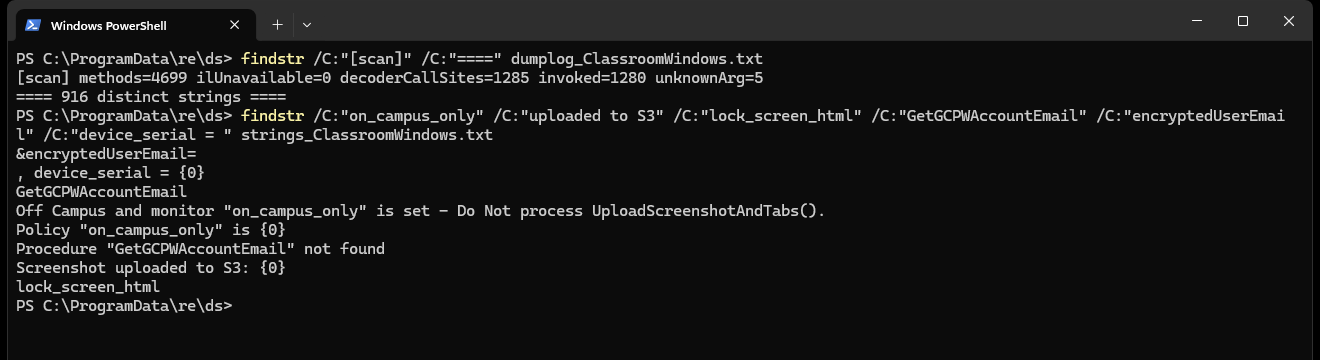 decrypted strings from the classroom agent
a screenshot every three seconds#
the most interesting module is called ScreenshotUploadModule. it does exactly what the name says: grabs the entire desktop, jpeg-compresses it, and uploads it on a timer.
the capture is a plain GDI blit of the desktop window
Gdi32.BitBlt(dst, 0, 0, w, h, desktopDC, 0, 0, 0x00CC0020 /* SRCCOPY */)
the cadence (upload_interval) defaults to 3.0 seconds, and it fires automatically whenever a group's class_schedule says the current time is "in class", so no teacher has to click anything. it quality-steps the jpeg down (50, then 30) until it's under ~500kb, tags it with the customer id, your user_guid and the device serial, grabs a presigned s3 url, and uploads.
please remember that it is silent. when a website asks to share your screen, chrome forces that "you are sharing your screen" bar to stay on screen. BitBlt from the desktop does not. there is no bar, no icon, no light. on top of the stored screenshot trail there's also a live view over webrtc (WebRtcNative.dll is literally google's desktop_capture with the dxgi, gdi and magnifier capturers compiled in), keyed TCH::<teacher>::STU::<student>. same deal: no indicator.
and here's where parents should sit up. whether any of this is limited to school or follows the laptop home is a single flag on lightspeed's server, not a line in the code!!
Policy "on_campus_only" is {0}
Off Campus and monitor "on_campus_only" is set - Do Not process UploadScreenshotAndTabs().
Off Campus Network and Not monitoring - Do Not process Handle_StartRecording().
if on_campus_only is set, it backs off on a non-school network. if it isn't, it keeps going... bedroom, 9pm, home wifi, doesn't matter. the surveillance capability is always installed and always running whether it watches your kid at home is a boolean in a dashboard you've never seen.
if that sounds familiar it's because we did this exact thing in 2010 with webcams robbins v. lower merion and apparently learned nothing except how to do it to the whole screen.
isnt that... illegal??
it reads what you type#
the chrome extension, blandly named "lightspeed filter agent", runs a content script on every page, every frame. inside is a routine the devs named GatherIntent, and it reads the value of what you're typing
case "input":
  var o = e.target.type || "text";
  if ("password" === (o = o.toLowerCase())) break;  // they skip passwords, credit where due
  t = [e.target.value];
  break;
case "textarea":   t = [e.target.value]; break;
// contenteditable [role=textbox] too -> gmail compose, google docs body, etc.
so, your chatgpt and gemini prompts, the gmail you're writing, the whole google doc, search queries, draft posts.
passwords are deliberately skipped, i'll give them that. everything else is read and checked against a server-supplied keyword list.
the manifest is where it stops being a filter and starts being a management agent. look at what it asks for!!
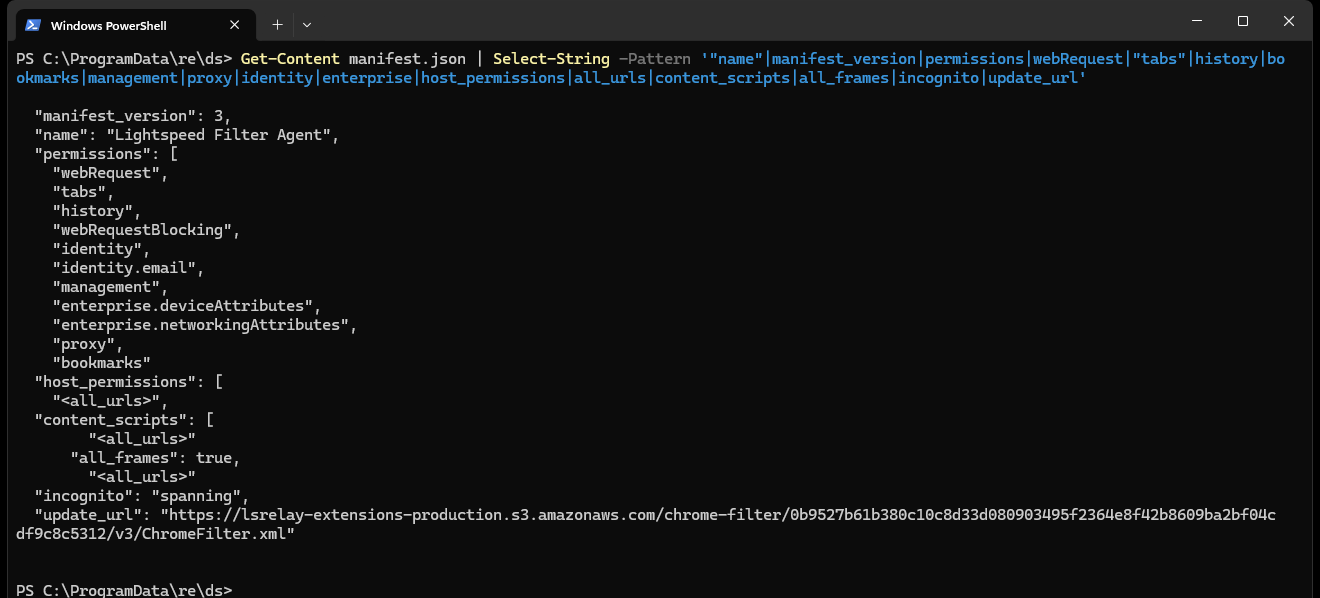
proxy, management, history, bookmarks, webRequestBlocking, identity.email, and "incognito": "spanning".
a few of those earn a mention:
"incognito": "spanning", the monitoring explicitly follows you into private browsing.proxy, it callschrome.proxy.settings.set, i.e. it controls where all your traffic goes.management, it callschrome.management.getAll()and reports every other extension you have installed (LogInstalledApps, roughly every 8 hours).bookmarks, not just reads. it callschrome.bookmarks.remove. it can delete your bookmarks.history, requested, and then never used anywhere in the shipped code. an unused grant of your full browsing history, just sitting in the manifest.webRequestBlockingin MV3 is only available to force-installed enterprise extensions, which tells you how this gets deployed.
every build is also stamped with the district it was cut for. the customer ids follow a fixed shape (something like c-60-####-a###) so a copy of the extension literally identifies the school system it belongs to.
it knows who you are#
none of this is anonymous. a native helper, Util.dll, exports GetGCPWAccountEmail
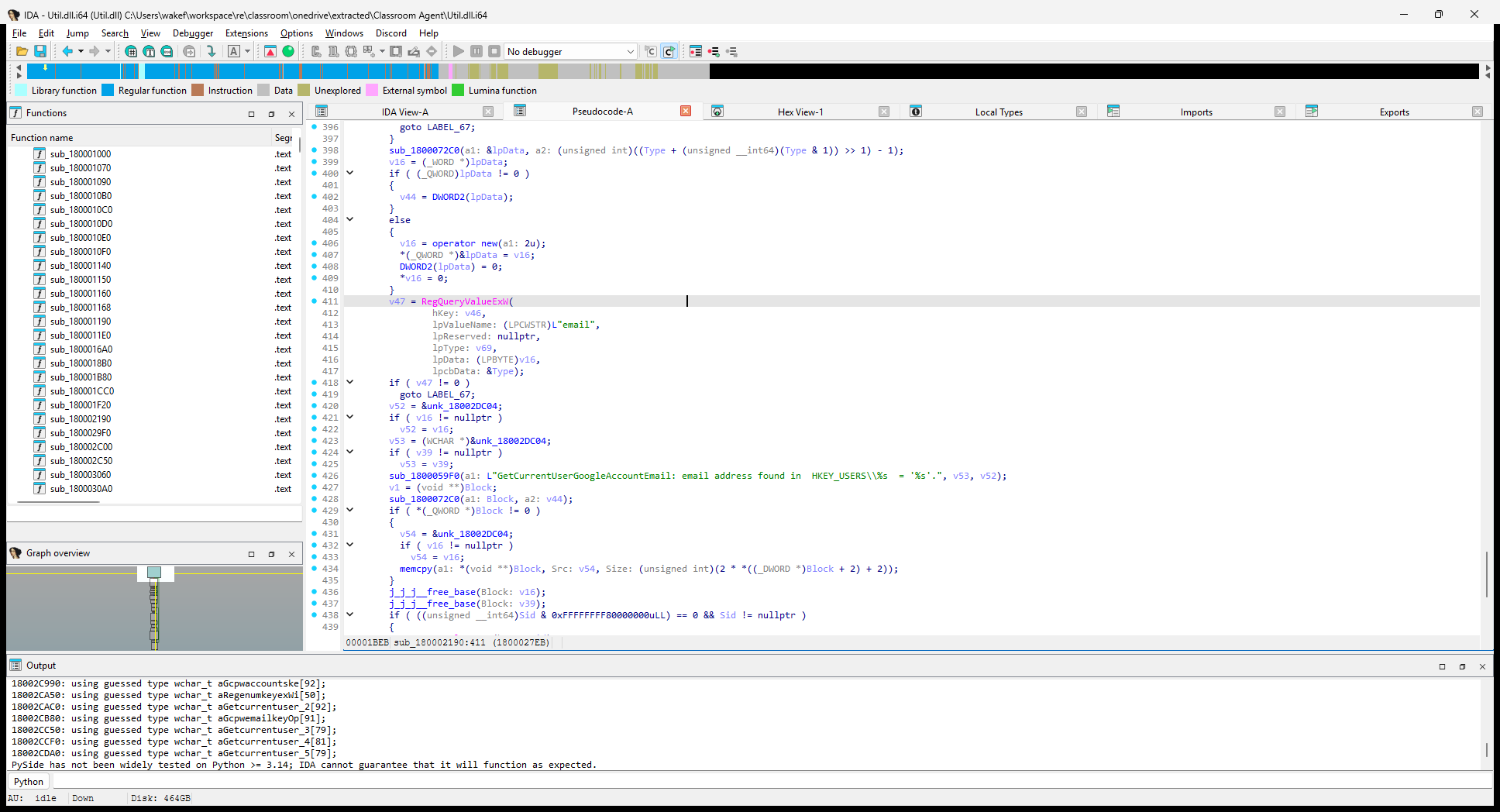 reading
email out of HKEY_USERS\<sid>\...\Google\Accounts. "email address found" is their log line, not mine.
in human words, it reads Software\Google\GCPW\domains_allowed_to_login (google credential provider for windows), resolves the SID of whoever's logged in at the console, and pulls the email value out of their google accounts key. a sibling export does the same for microsoft accounts. then it's correlated with the BIOS serial (Select SerialNumber From Win32_BIOS), a persisted ls-udid written to both the registry and programdata so it survives reinstalls, the machine name, the public IP and the LAN IP into one durable profile that follows you across logins.
the small detail that bugs me is that the harvested email gets sent as &encryptedUserEmail=... it's encrypted, fine, but as a url query parameter, which is exactly the thing that ends up in plaintext server and proxy logs.
it can take over the machine#
the monitoring isn't passive. over its realtime channel (ably) the agent takes server-pushed commands: NewTab(url) to open any url, CloseTabWithId / FocusTab to move you around, and Lock to lock the screen. the lock is aggressive,, fullscreen overlay, pinned to every virtual desktop, keyboard/mouse hooks and touch redirected so you can't use your own machine — and the lock message is a field called lock_screen_html. the content on the locked screen is arbitrary html, delivered from the server. whoever can send on that channel can render whatever they want on a locked kid's laptop.
and then they left the key in the door#
if the surveillance is the story, the security is the twist.
inside the chrome extension's main.js, the one served from a public s3 bucket that anyone can download, is a config block with a live, long-term aws access key and secret. not a temp token. a standing AKIA... credential, in client-side javascript, shipped to every device:
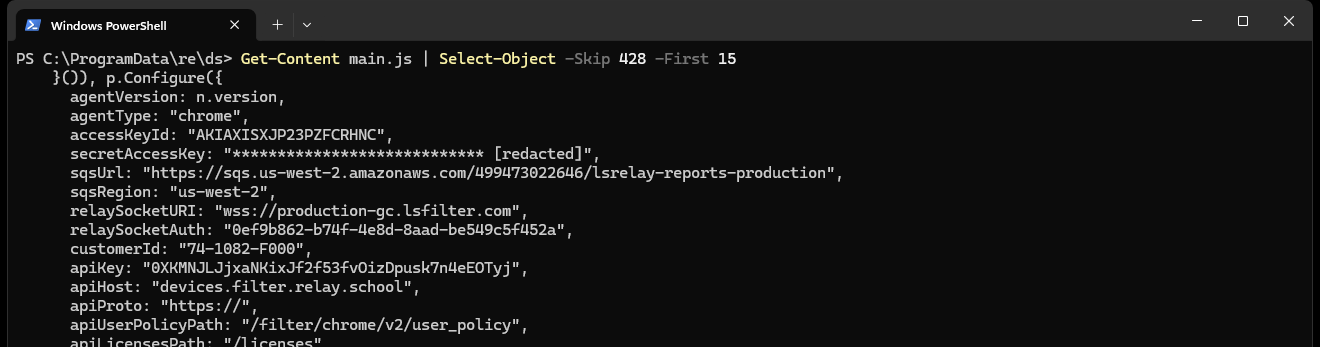 i've redacted the secret. i did not test what it unlocks, but its presence is not in question.
that's an AKIA... long-term IAM key, its secret, a production SQS url, a relay auth guid and a tenant api key, all readable by anyone who unzips the crx.
and it gets better, because the windows agent runs as SYSTEM and updates itself. i decrypted the updater (CW_Svc_Server.dll) specifically to see how it verifies what it's about to run with the highest privilege on the box. the answer is: it checks the version number.
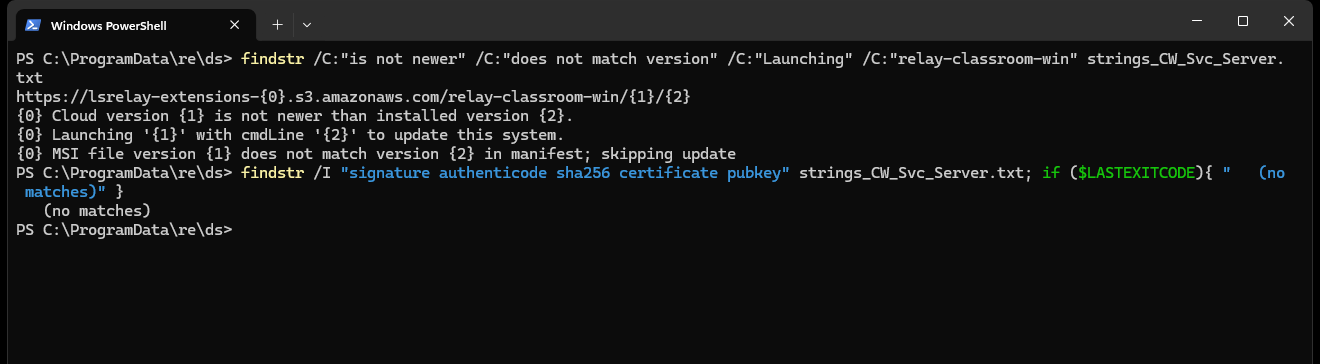 downloads from s3, compares a version number, runs msiexec. grep the whole thing for any signature / authenticode / hash check: nothing.
there is no application-level signature check anywhere in it. the clickonce deployment manifest is unsigned too (publicKeyToken="0000000000000000"). the integrity of a SYSTEM-level auto-update, across a whole district, rests entirely on amazon's access controls and TLS.
now, in all fairnes because i want this to hold up... the distribution bucket is not listable (i tried; ListBucket returns 403) and the public can't write to it, so this is not a one-click "anyone can push malware to every school" button.
BUUT. anyone who gets write access to that bucket, or a privileged key, or a position on the wire, gets to run code as SYSTEM on a lot of children's laptops. it is just NOT where you want to be with that blast radius.
the part i can't tell you#
the person who sent me the build mentioned, secondhand, that the filtering is "a bit queerphobic". so, i went looking.
in the decrypted code there is no "lgbtq" or "lifestyle" blocking category. the current docs actually treat sexual orientation as a protected attribute (blocking hate at lgbtq people). on the artifacts alone, the claim isn't supported. the decrypted pool only has the mechanism (/classroomBlockedCats, category_id, /filterBlockInfo) — the actual category and keyword lists come from the server.
which is the actual problem. the list of flagged words that the monitoring side alerts on is server-side and per-district. it is, by design, not in the software, not auditable from outside. that's exactly the component where lightspeed's competitors goguardian and gaggle were caught flagging lgbtq terms and quietly removed them under pressure. lightspeed itself shipped an education.lifestyles category that blocked lgbt resources until the aclu made them stop — in 2011. there's no public record they've audited their monitoring defaults since. so the honest verdict is unconfirmed, and the unverifiability is the finding: a system that watches what kids type, ties it to their names, and keeps its watchlist secret is one you have to take purely on faith.
that's a lot of faith for a company that left an aws key in a zip file.......
what i'm not claiming#
so this doesn't get strawmanned: i enumerated the windows agent's modules and there is no keylogger, no clipboard capture, no microphone, no webcam. the surveillance is screen + browsing + typed-text-via-the-extension. the agent also carefully restarts itself on user-switch so it doesn't attribute one kid's activity to another, and the local bridge it runs (localhost:6543) actually validates the calling process's session and SID before answering. some of this is competently built. that's not the issue. the issue is the breadth, the secrecy, and the fact that it reaches into homes and private browsing on a server's say-so.
what to actually ask#
filtering is a legal requirement for schools that take federal money, and some of these controls are defensible in a classroom. this isn't "rip it out". it's "stop hiding what it does". if your district runs lightspeed, these are fair questions, in writing:
- is
on_campus_onlyturned on? plainly: can this take a screenshot of my kid at home? - what's the full monitoring keyword list, and when was it last audited?
- which features can lightspeed switch on remotely, without the school doing anything?
- exactly what data leaves the device, and to whom?
and to lightspeed, two that aren't about policy at all: rotate the key you shipped in a public file, and start signing the software you run as SYSTEM on children's computers.
the pictures are already being taken. the least everyone deserves is to know the light is off.
and is this even legal? i don't even know, honestly.
if this was useful and you want me to keep pulling these things apart, you can buy me a coffee. it's what pays for the hours that aren't billable. no pressure, and thanks to everyone who already has.
small print: static reverse engineering of software that's publicly downloadable or was lawfully obtained from a licensed deployment. no lightspeed server was authenticated to and no third-party credentials were used — the only network traffic was passive dns and unauthenticated requests to their public bucket. the sample came from a qa/test tenant; no real student's data was looked at.
Spotted a mistake? This phile is a file; send a fix.